Hear your AI think.
A macOS menubar app that turns Claude Code into a radio station. Real-time procedural audio that changes with every thought, tool call, and response.
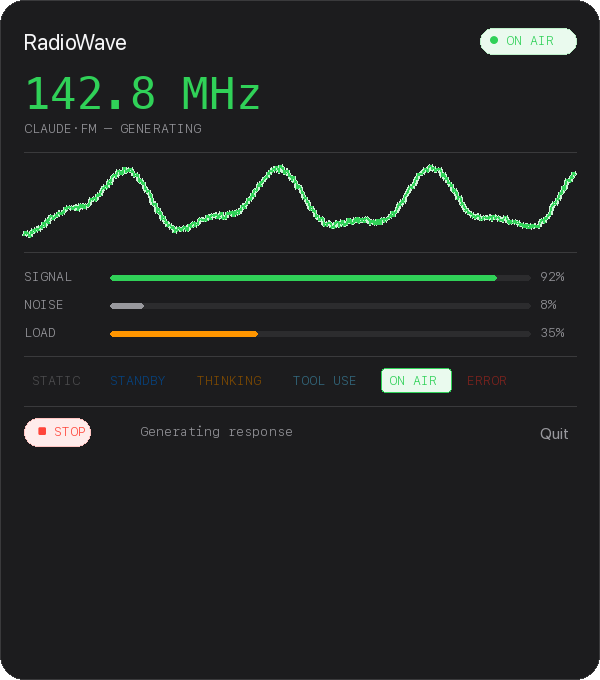
Live popover — menubar app, no dock icon
Radio States
Warm atmospheric static with stereo crackle, distant sweep ghosts, and faint morse code fragments.
Contemplative chord drones, oceanic pads, or eerie number station transmissions. Randomized each time.
Mechanical clockwork, dialup modem handshakes, or rapid teletype clicks with confirmation bells.
Rich FM synthesis, gentle music-box arpeggios, or deep pulsar rhythms. The signature sound.
Descending siren with warm distortion, or digital glitch with bitcrushed stuttering.
Every state change sounds like turning a physical radio dial. Static, fragments, then lock.
Built for developers who listen.
- Procedural audio — all sounds generated in real-time, no samples
- Randomized variants — 2-3 presets per state that rotate
- Stereo spatial — crackles, drones, and tones move across channels
- Claude Code hooks — official API, auto-installed, zero config
- Tuning transitions — the star of the show
- Animated waveform — 60fps Canvas visualization
- Menubar only — no Dock icon, no window
- Full settings — volume, static, launch at login
- Demo mode — preview all sounds without Claude running
- Open source — MIT license, build from source
Get started in 4 lines.
cd RadioWave
xcodegen generate
open RadioWave.xcodeproj
Requires macOS 14+, Xcode 15+, and XcodeGen. Build and run — it appears in your menubar.
Or download the pre-built DMG from the GitHub releases.
Troubleshooting
macOS blocks unsigned apps by default. Go to System Settings → Privacy & Security, scroll down, and click "Open Anyway" next to the RadioWave message. You only need to do this once.
RadioWave is a menubar-only app — it does not appear in the Dock. Look for the antenna icon (📡) in the top-right area of your screen, near the clock. If it's hidden behind the notch on newer MacBooks, try clicking the area to the left of your existing menubar icons.
Click the menubar icon to open the popover. Check that the volume slider is not at zero. Also verify Claude Code is actually running — RadioWave only produces sound when it detects an active Claude Code session. Use Demo Mode (click the state buttons in the popover) to test audio without Claude.
RadioWave uses Claude Code hooks to receive real-time events. On first launch it auto-installs the hook to ~/.claude/settings.json. If detection isn't working: (1) Restart Claude Code after installing RadioWave, (2) Check that the hook exists in your settings file, (3) Make sure port 19847 is not blocked by a firewall.
Run this in Terminal to remove the quarantine flag:
xattr -cr ~/Downloads/RadioWave-v1.0.0.dmg
Then double-click the DMG again. Alternatively, build from source using the 4 lines above.
Open RadioWave → Settings → Connection tab → click "Uninstall Hook". Or manually remove the RadioWave entry from ~/.claude/settings.json.